📨 Google Admin Weekly: Is Google blocking search for students?


Hello Reader,

On November 3, Google announced it was changing its default policy for generative AI tools:

After listening to schools, teachers, leading researchers, and policymakers, we are now updating our approach to controls for Gemini, Gemini Notebook, Gemini in Classroom, and Google Search. Access to these products will be entirely off for K-12 student accounts until school administrators explicitly turn them on. Source​

The days following this announcement were a disaster for Google’s public relations department. 🗑️🔥 The internet was flooded with headlines like these:

  • Google Will Turn Off Search for Schools That Reject A.I. (NY Times)
  • Google Will Disable Search for Schools Banning AI (Forbes)
  • Parents and teachers decry Google pledge to yank Search if schools block AI: ‘This threat is nothing but extortion (The Guardian)

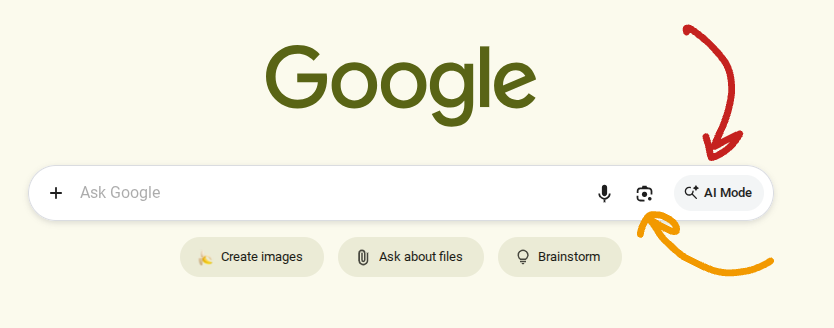
The truth is a little more nuanced than these headlines would suggest. It IS possible to disable AI mode for students without cutting off search access completely, but you have to get creative. Let’s take a closer look at what’s going on and what you should do about it.

Sponsor

How many Chromebooks did your school lose this year?

If the honest answer is “not sure,” you need VIZOR. It tracks every device from check-out to return, so a missing Chromebook becomes a quick fix instead of a mystery.

  • ⏰ Spot overdue Chromebooks before they become “lost”
  • 🔄 Catch devices students have swapped
  • 🔒 Automatically disable lost, stolen, or overdue Chromebooks so they are useless to anyone but you
  • 📲 Send automated notifications to families
  • 💲Calculate chargeback fees and bill for replacements when needed

Schedule a demo...get a snarky tech cup!

AI Mode for Search

In 2024 Google began incorporating AI elements into their traditional search engine. By 2025, AI Mode and Lens Search became standard element of the search experience.

Since the launch of these features, Teachers and IT admins have expressed concern about student access to this version of search. Common Sense media labeled Google’s AI search an “unacceptible risk” in July of 2026. I have personally expressed my concern about AI search at several Google events I attended.

Google is addressing these concerns in two ways:

  • Guided Learning – starting in the coming months, users under the age of 18 will “see prompts to help them think critically and work through the concepts, without going directly to the answer.” This new experience is being piloted now and is expected to go live in early 2027.
  • Search Access Controls – if a district isn’t comfortable with students using AI mode for search, they have the option of turning off search entirely for students. These controls will be available in early 2027.

These are Google’s two official solutions, and a lot of districts aren’t happy with either one.

Upcoming Events for Google Admins

Want to host a Google Admin workshop in your area? Get in touch!

How to Disable AI Mode for Search (my solution)

Google did not offer the ability to disable AI mode for search so that students can use the “traditional” search experience. Chris Philips, VP of education at Google told the New York Times that “Search and AI are deeply integrated,” suggesting that it was no longer possible to separate the two features.

👉 Google should provide an official way to disable AI mode for search. I don’t buy the explanation that search and AI are so intertwined that this can’t be done. I’m sure there are enough smart people working at Google who could figure this out.

As the IT admin for a half-dozen different districts, I refuse to wait around for someone else to come up with a solution. I’m in the business of figuring out solutions to complex problems.

You actually CAN disable AI mode and Google lens for students, you just have to get creative! It’s not a perfect solution, but it will get you 90% of the way there! See my full breakdown on how to disable AI mode for search step-by-step, in the video below, or read this blog post which contains the specific URLs you need to enter into the admin console to configure the search experience.

video preview​

The admin console contains thousands of policies and configuration options. Mastering the console is the best way to ensure that your district gets the features and safeguards that it needs. The primary purpose of this newsletter is to share tips and strategies to help you determine what is best for your district. And if you need a hand, I'm available to help!

Regards,

John R. Sowash

Did someone forward this email to you? You can subscribe here!


John Sowash is a former teacher and an "accidental" Google Administrator. For more than a decade John has been helping schools use technology in meaningful ways. John lives in Michigan with his wife and five kids.

​Google Admin Bootcamp | Chromebook Academy | Google Admin Audit​

3606 Woodridge Dr. , Howell, Michigan 48843
​
Unsubscribe · Preferences​

The Google EDU Update

Tired of missing out on the coolest Google updates and new features? Join thousands of other teachers who rely on my monthly newsletter to stay ahead of the curve. Get the top 10 updates, teaching inspiration, and time-saving links delivered straight to your inbox.

Read more from The Google EDU Update

Hello Reader, If you’ve been looking for a tangible way to validate your technical expertise, document your skills for a promotion, or simply test your knowledge against Google’s official benchmarks, you should check out the ChromeOS Administrator Certification. This exam is an official certification from Google designed to document your ability to deploy, manage, and secure Chromebooks using the Google Admin Console. Here are the basics: Cost: $125 registration fee Format: 50 multiple-choice...

Hello Reader, Last week you should have received an email from Google with the subject line "Important updates to your Google Workspace Terms of Service regarding Agentic AI." If reading through multi-page legal addendums and enterprise cloud clauses left your eyes crossed, you aren't alone. 😵💫 Here’s the "non-lawyer" version of the policy change: “If one of your users creates an AI agent that break something or does bad stuff, it’s not our fault.” This policy change isn’t something you need...

✨ FREE LIVE Session: Earn a Gemini Badge with me TONIGHT at 7pm EST! ✨ Hi Reader! I've been speaking at several fall conferences the past few weeks. Its great to get out of the office and meet people "IRL"! I enjoyed attending MASS CUE in New England and the Great Lakes Unity conference in Grand Rapids, MI. During these events I had an opportunity to introduce teachers and administrators to the Google Educator Series, a really neat program from Google that allows you to earn official Gemini...